
Jordan D. Gavin, MRes1; Palmer O. Welters1; Sam Dhothar, MHS, CHSOS-A1
1School of Health Sciences Simulation Program, British Columbia Institute of Technology, Burnaby, BC, Canada
Corresponding Author: Jordan D. Gavin, jordan_gavin@bcit.ca
SUMMARY
This paper presents a quality improvement project developed within the British Columbia Institute of Technology (BCIT) School of Health Sciences Simulation Program. Using the Plan-DoStudy-Act (PDSA) framework – widely implemented in healthcare for iterative, evidence-informed process improvement (Leis & Shojania, 2017) – the project identified an operational problem and designed a targeted intervention to address it. Specifically, this paper explores BCIT's design, implementation, and impact of a Quick Response (QR) based workflow automation system using Microsoft SharePoint, Forms, and Power Automate. Power Automate workflows were created to address persistent operational challenges, many of which are commonly found throughout healthcare simulation centers (Krishna Debbadi & Boateng, 2025; Zayas-Cabán et al., 2021).
In this paper, we outline the potential for low-code automation and standardized digital reporting to reduce cognitive load, eliminate undocumented equipment issues, improve maintenance accountability, and enhance communication between faculty and simulation operations teams. Digital transformation and Artificial Intelligence (AI) supported workflows are positioned as a scalable and cost-effective model for simulation centers seeking to modernize operations.
INTRODUCTION
Healthcare simulation centers are specialized educational environments designed to replicate clinical scenarios for the training and assessment of health sciences students and professionals (Dleikan et al., 2020). By providing a controlled, risk-free setting in which learners can practice clinical skills, respond to emergencies, and develop clinical decision-making, simulation centers serve a critical role in preparing the healthcare workforce (Saleem & Khan, 2023). The effectiveness of these environments depends not only on the quality of the educational programming but also on the reliability and readiness of the equipment and technology that supports it (Mitchell & Ivimey-Cook, 2023).
Central to the daily function of a simulation center is the simulation technologist, a role with responsibilities that include equipment setup and teardown, manikin programming, audiovisual system management, scheduling support, and technical troubleshooting (Tellefson et al., 2025). Unlike clinical departments with long-established administrative infrastructures, simulation teams are typically small and specialized, meaning each technologist carries a broad scope of responsibility (Bailey et al., 2015). This makes efficient workflow organization and reliable communication systems essential to maintaining a functional simulation environment.
Inconsistent and informal reporting processes can be detrimental to the effectiveness and efficiency of simulation centers, as they lead to undocumented issues and delayed maintenance or repair of equipment (Mwanza et al., 2023). Functioning equipment is a necessity within simulation centers, and damaged or malfunctioning equipment can disrupt or even prevent the facilitation of simulations (Schram et al., 2024). As a result, simulation technologists may be required to repair equipment in the middle of active simulations. This is a problem that can negatively impact simulation centers by making inefficient use of simulation technologists’ time and compromising the educational value of simulations.
This paper presents a quality improvement initiative developed at the BCIT School of Health Sciences Simulation Program to address these challenges through the implementation of a QR-based workflow automation system using Microsoft SharePoint, Forms, and Power Automate. This workflow aimed to replace informal, verbal reporting with a standardized, automated process that ensures every equipment issue is captured, routed, and resolved in a timely and accountable manner.
BACKGROUND
Before turning to a more automated workflow system, the BCIT simulation center faced recurring operational issues involving equipment maintenance. Faculty reported equipment issues informally and inconsistently, often relying on incidental contact with available simulation technologists rather than a standardized reporting process, leading to problems going undocumented. Intermittent malfunctions were particularly susceptible to this gap, as some issues would go unreported and unresolved until the next academic term. Meanwhile, maintenance history for high-fidelity equipment such as IV pumps, ventilators, defibrillators, and manikins, all of which require timely and accurate troubleshooting, was fragmented across email threads, handwritten notes, and individual memory. Simulation technologists overseeing maintenance could only respond to issues they were made aware of, and without a formal logging system. Many problems repeatedly resurfaced because they had never been properly documented or resolved.
The absence of a standardized reporting system created blind spots in the daily operations of the simulation center, leading to delays, inconsistent documentation, and safety concerns. The need to incorporate workflow automation into healthcare settings has been discussed in previous research, as its success in other industries has made its benefits apparent (Mwanza et al., 2023; Zayas-Cabán et al., 2021). However, many commercial software solutions fail to fully address the unique operational challenges of facilities such as simulation centers, making it necessary to redesign or build new automated workflows (Zayas-Cabán et al., 2021; Zayas-Cabán et al., 2023).
Incident reporting systems in healthcare have a well-established role in identifying and resolving operational gaps (Archer et al., 2017). Structured reporting mechanisms create accountability, enable trend analysis, and support evidence-based decision-making (Zayas-Cabán et al., 2021). When applied to simulation operations, these principles translate directly to a system that captures every equipment issue at the point of occurrence, routes it to the appropriate person, and tracks its resolution, addressing the core failures that characterized the previous informal approach.
Microsoft Power Automate has emerged as a practical platform for building these kinds of automated workflows within institutional environments. Its low-code design allows users to create custom workflows, notifications, and data collection tools without requiring a dedicated software engineer or advanced programming expertise (Pearson et al., 2020). The program operates as a rulebased intelligent automation platform, where user-defined logic drives execution. When a condition is met, such as a form submission, a predefined sequence of actions is triggered: routing notifications, logging data, and updating records. This is fundamentally different from deep learning AI, which trains on data to make independent predictions (Jakhar & Kaur, 2020).
Power Automate operates seamlessly within the Microsoft 365 ecosystem, enabling integration with SharePoint for data storage, Forms for standardized data collection, and Outlook for automated notifications. The program enables seamless integration with large corporate-level systems, making it well suited for complex institutional environments (Krishna Debbadi & Boateng, 2025; Pearson et al., 2020). As highlighted in recent case studies, organizations across different sectors have used Power Automate to move away from outdated processes, eliminate manual inefficiencies, and modernize data-driven reporting structures (Zayas-Cabán et al., 2021). These examples demonstrate how this style of automation can transform operational strategies by improving consistency, accountability, and response time.
Existing literature on AI-constructed automation shows that it has the potential to improve decision-making, reduce administrative burden, improve data accuracy, and allow workers such as simulation technologists to focus on high-value tasks (Oyangoren & Camilo, 2025).
OBJECTIVES
The objective of this quality improvement project was to design and implement a QR-based workflow automation system for equipment issue reporting and maintenance tracking within the BCIT School of Health Sciences Simulation Program. The system was developed to address persistent operational inefficiencies, specifically the reliance on informal, undocumented communication channels. Using Microsoft SharePoint, Forms, and Power Automate, the goal was to replace these ad hoc processes with a standardized, automated reporting workflow accessible to all faculty and staff via personal smartphones.
METHODS
The PDSA (Plan-Do-Study-Act) framework (Leis & Shojania, 2017) was used to structure the improvement process, beginning with a clear identification of the operational problem in the Plan phase, followed by the implementation of the automated workflow in the Do phase, observation of its effects in the Study phase, and ongoing refinements based on team feedback in the Act phase. This iterative approach ensured that decisions were grounded in observed outcomes and allowed the team to make incremental adjustments as the system was adopted across the simulation center.
Our Simulation Operations Lead, co-author (SD), designed and tested several workflows where major pieces of equipment at our simulation center, including patient simulators, IV pumps, defibrillators, ventilators, and patient monitors, were each assigned a unique identifier. For example, our SimMan3G high-fidelity patient simulators were given unique identifiers such as S01, S02, S03, etc. These identifiers enabled Power Automate to accurately track each asset and dynamically update the inventory database within SharePoint. Furthermore, each physical inventory item was fitted with a QR code sticker, allowing staff to quickly scan equipment at the point of use.
Each QR code provides immediate access to a Microsoft Form (Figure 1), allowing faculty and staff to report issues quickly and consistently using their personal smartphones without requiring additional software or login credentials. Each form takes a matter of seconds to report any issues, which then triggers an email alert to our simulation technologists.
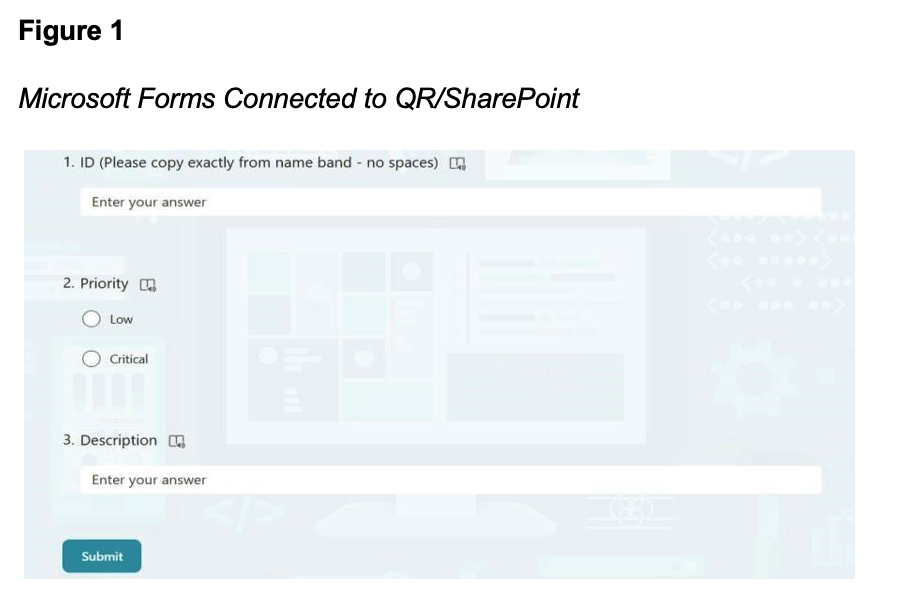
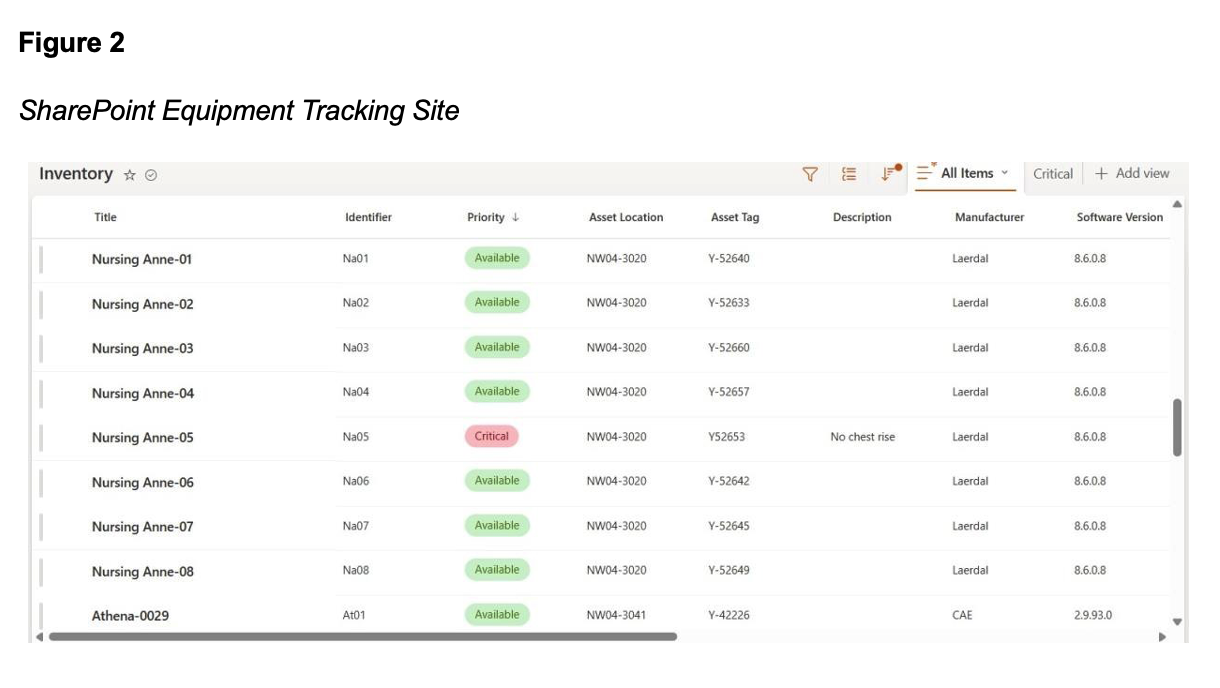
When an issue occurs, the user scans the QR code attached to the equipment. This action opens a standardized form prompting the user to identify the equipment using the unique identifier, select whether it is low or critical priority, and briefly describe the issue. Upon submission, Microsoft Power Automate triggers an automated workflow that sends a notification email to the appropriate simulation technologists and simultaneously logs the issue into a centralized SharePoint tracking list (Figure 2). This SharePoint tracking list serves as the centralized database populated by each form submission.
Each row in the tracking list corresponds to a single piece of equipment, with columns reflecting the form fields completed by the user, including the equipment identifier, issue description, priority, and submission timestamp. Additional fields visible in the tracking list, such as status and resolution notes, are completed manually by the simulation technologist after the issue has been reviewed and addressed, allowing the team to monitor each report to completion. Aggregated data from the tracking list can be exported for accreditation reporting, equipment lifecycle management, budget forecasting, and incident trend analysis. This structured workflow ensures accountability and prevents issues from being overlooked, which is often an ongoing challenge in simulation programs. Our current use of Power Automate is not just a single-use tool but rather can be a part of a progressive digital transformation pathway. For our site at BCIT, we find that this ensures no reported issue disappears, solving a problem that our team used to frequently encounter.
Simulation centers interested in replicating this workflow can do so using tools already available within the Microsoft 365 ecosystem, specifically Microsoft Forms, Power Automate, and SharePoint. The following steps outline the process in the order they should be completed.
Step 1: Create Your SharePoint Tracking List
Begin by setting up a SharePoint site that will serve as the central repository for all equipment issue reports. Within that site, create a list with columns corresponding to the information you want to capture for each report. Recommended fields include Equipment ID, Equipment Type, Issue Description, Location, Date Submitted, Status (e.g., Open, In Progress, Resolved), and any additional notes from the operations team. This list will become the live database that your team monitors and updates as issues are reported and resolved. Establishing SharePoint first is important because it will be the destination that both the form and automation workflow will connect to.
Step 2: Assign Unique Identifiers to All Equipment
Before building the form, assign a unique alphanumeric identifier to every major piece of equipment in your simulation center. A simple, consistent naming convention works best. For example, SimMan3G units can be labeled S01, S02, and S03, while IV pumps might follow a separate sequence such as IV01, IV02, and so on. These identifiers serve as the critical link between the physical equipment and the digital tracking system, allowing Power Automate to correctly log and route each report to the appropriate entry in SharePoint. Once identifiers are assigned, create a corresponding master inventory list in SharePoint that maps each ID to its equipment type, location, and any relevant lifecycle information.
Step 3: Build Your Microsoft Form
With your SharePoint list established and your equipment identifiers defined, the next step is to create the reporting form in Microsoft Forms. Navigate to Microsoft Forms through your Microsoft 365 account and create a new form. Design the form to collect the essential information needed for each report: the equipment's unique identifier, a description of the issue, and the location of the equipment. Keep the form as concise as possible. The goal is for faculty or staff to be able to complete and submit it in under a minute. Once the form is complete, copy the shareable link, as this will be embedded in your QR codes in the next step.
Step 4: Generate and Print QR Codes
In Microsoft Forms, open your form, click the share button, and select "QR code" to download a scannable image that links directly to your form. If you have created separate forms for different equipment categories, generate a corresponding code for each. Print the QR codes as durable sticker labels and affix them directly to each piece of equipment in a visible, accessible location. When scanned with a smartphone, the QR code should open the form immediately, without requiring the user to log in or download any application. At this stage, it is also helpful to include the equipment's unique identifier on the same label as the QR code so users can easily reference it when completing the form.
Step 5: Build Your Power Automate Workflow
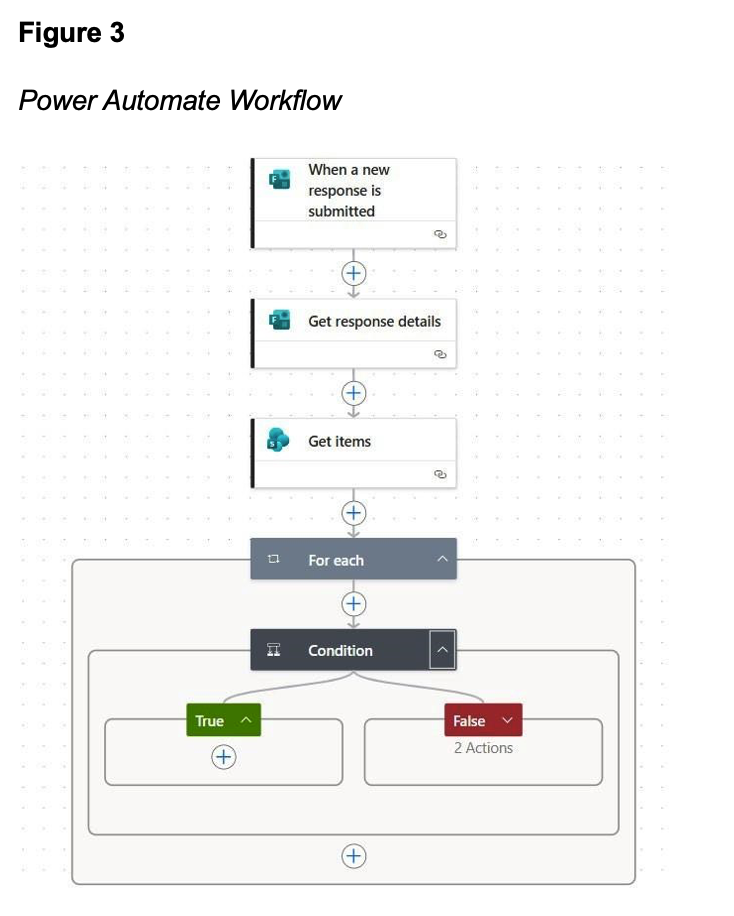
Microsoft Power Automate acts as the engine that connects your Microsoft Form to your SharePoint list and triggers notifications to your team. To begin, create a new automated cloud flow and select the trigger "When a new response is submitted", linking it to your Microsoft Form. Next, add "Get response details" to extract the individual answers from the submission. Then, use "Get items" to retrieve records from your SharePoint list. The flow then uses a "For each" loop to go through the returned items, followed by a Condition that compares a value from the form response to a value in the SharePoint list. This effectively asks: does this existing SharePoint record already match the submitted form response?
If the condition evaluates to “True”, the item is already accounted for, and the flow skips it, continuing to check the remaining records. If it evaluates to “False”, no matching record exists, so the flow performs two actions: updating the SharePoint list with the new submission and sending a notification email. This ensures that only unmatched responses trigger an update, preventing duplicate entries from being created in the list. Finally, add an email notification action, such as "Send an email (V2)" via Outlook, configured to alert your simulation operations team whenever a new report is submitted. The email can be customized to include the equipment ID, issue description, and a direct link to the SharePoint entry for immediate review. Save and test the flow by submitting a sample form response to confirm that the SharePoint list populates correctly and the notification email is received (Figure 3).
Step 6: Train Your Team and Launch
Before going live, brief both faculty and simulation operations staff on how the system works.
Faculty need only understand one thing: scan the QR code on the equipment and complete the form. Operations staff should be oriented to the SharePoint tracking list, specifically how to update the status of each issue as it moves from “open” to “in progress” to “resolved”, and how to add internal notes as maintenance is carried out. Establishing a clear expectation that all issues must be logged through the system, rather than communicated verbally, is essential to the workflow's effectiveness. A short demonstration at a team meeting or via a brief instructional video attached to each QR code station is sufficient for onboarding most users.
Step 7: Monitor, Export, and Iterate
Once the system is live, your SharePoint tracking list becomes a living record of all equipment issues across your simulation center. Over time, patterns may emerge, such as recurring issues with specific equipment, seasonal spikes in maintenance requests, or gaps in resolution times, all of which can inform purchasing decisions and preventive maintenance strategies. Teams are encouraged to revisit the form design and workflow periodically to ensure the system continues to meet operational needs as the simulation center grows.
RESULTS
Success was defined by the system's ability to ensure that every submitted equipment report was automatically logged, routed to the appropriate simulation technologist, and tracked through to resolution, reducing the possibility of issues being lost or forgotten. Secondary indicators of success included positive feedback from faculty and simulation technologists regarding ease of use, reduced administrative burden, and improved confidence that reported issues would be addressed systematically.
It is worth noting that this manuscript is a quality improvement project rather than a formal research study, and as such, feedback was not collected through structured research methods such as surveys or controlled observation. Rather, the outcomes described here reflect the experiential findings of our team following the rollout of the system.
With that context in mind, the system was found to meet each of the core objectives it was designed to address. Standardized reporting was achieved through the QR code and Microsoft Forms workflow, which replaced all informal verbal and email-based communication with a consistent, accessible submission process. Tracking and documentation were established through the centralized SharePoint list, which captures every submission with a timestamp, equipment identifier, issue description, and resolution status. Timely issue resolution was supported through automated email notifications to simulation technologists, ensuring that no submitted report goes unacknowledged.
Faculty noted several positive changes since implementation, including more efficient reporting using QR codes, reduced uncertainty about who to contact when an issue arises, and greater trust that reported problems would be addressed. Simulation technologists observed that fewer repeated problems were encountered during setup, day-to-day organization had improved, and the timestamp and categorization features of the tracking list allowed them to prioritize their workload more effectively.
Perhaps most practically, the aggregated data generated by the system has begun to provide evidence-based justification when making the case for repair budgets and equipment replacements, a persistent challenge in simulation operations that has historically relied on anecdotal reporting. As Boppana (2023) notes, automation is not merely a convenience; it is a strategic advancement that allows institutions to work smarter, reduce risk, and deliver a consistently high-quality experiential learning experience.
Ultimately, the system successfully replaced an informal, undocumented reporting culture with a structured, automated workflow that aligns with the objectives established in the Plan phase of the PDSA cycle. The ongoing Study and Act phases continue through periodic review of submission trends, faculty feedback, and incremental refinements to the workflow as the simulation center grows.
DISCUSSION
The BCIT Simulation Operations Team’s implementation of a QR-based workflow automation system using Microsoft SharePoint, Forms, and Power Automate enhanced operational efficiency within our simulation center. We find that the workflow developed in this study moves beyond current literature on digital transformation, AI-supported automation, and healthcare operations by providing a practical real-world application that is tailored to the operation of a simulation center.
Beyond its immediate operational benefits, this project demonstrates a scalable model that can be adopted by simulation centers of varying sizes and resource levels. Because the system is built using widely available Microsoft enterprise tools and a low-code approach, it is both costeffective and accessible, which makes it particularly attractive for institutions with limited IT support or budgets. With minimal customization, the workflow could be replicated across academic institutions, healthcare training centers, and hospital-based simulation programs to standardize equipment reporting and maintenance practices.
As automation and artificial intelligence continue to advance, this system provides a strong foundation for future growth. Potential expansions include predictive maintenance, intelligent issue classification, and integrated analytics to inform purchasing decisions, lifecycle planning, and risk mitigation. Ultimately, this project highlights how thoughtful adaptation of digital tools can empower simulation teams, improve learner experiences, and contribute to a safer and more reliable educational environment.
Conflict of interest statement: The authors have no conflicts of interest to declare.
Please cite this article as: Gavin, J. D., Welters, P. O., & Dhothar, S. (2026). Advancing simulation equipment maintenance through workflow automation. Simulation Technology & Operations Resource Magazine, 5(2), 2433. ISSN: 3070-3506.
REFERENCES
Archer, S., Hull, L., Soukup, T., Mayer, E., Athanasiou, T., Sevdalis, N., & Darzi, A. (2017). Development of a theoretical framework of factors affecting patient safety incident reporting: a theoretical review of the literature. BMJ Open, 7(12), e017155. https://doi.org/10.1136/bmjopen-2017-017155
Bailey, R., Taylor, R. G., FitzGerald, M. R., Kerrey, B. T., LeMaster, T., & Geis, G. L. (2015). Defining the Simulation Technician Role. Simulation in Healthcare: The Journal of the Society for Simulation in Healthcare, 10(5), 283–287. https://doi.org/10.1097/sih.0000000000000103
Boppana, V. R. (2023). Automation using Power Platform. ESP International Journal of Advancements in Computational Technology, 1(2), 102–111. https://www.espjournals.org/IJACT/ijact-v1i2p111
Dleikan, C. T., Lakissian, Z., Hani, S., & Sharara-Chami, R. (2020). Designing a simulation center: an experiential guide. Journal of Facilities Management, 18(5), 487–504. Emerald. https://doi.org/10.1108/jfm-02-2020-0011
Jakhar, D., & Kaur, I. (2020). Artificial intelligence, machine learning and deep learning: definitions and differences. Clinical and Experimental Dermatology, 45(1), 131–132. https://doi.org/10.1111/ced.14029
Krishna Debbadi, R., & Boateng, O. (2025). Developing intelligent automation workflows in Microsoft power automate by embedding deep learning algorithms for real-time process adaptation. International Journal of Science and Research Archive, 14(2), 802–820. https://doi.org/10.30574/ijsra.2025.14.2.0449
Leis, J. A., & Shojania, K. G. (2017). A primer on PDSA: executing plan–do–study–act cycles in practice, not just in name. BMJ Quality & Safety, 26(7), 572–577. https://doi.org/10.1136/bmjqs-2016-006245
Mitchell, A. A., & Ivimey-Cook, E. R. (2023). Technology-enhanced simulation for healthcare professionals: A meta-analysis. Frontiers in Medicine, 10, 1149048. https://doi.org/10.3389/fmed.2023.1149048
Mwanza, J., Telukdarie, A., & Igusa, T. (2023). Optimising Maintenance Workflows in Healthcare Facilities: A Multi-Scenario Discrete Event Simulation and Simulation Annealing Approach. Modelling, 4(2), 224–250. https://doi.org/10.3390/modelling4020013
Oyangoren, M. O., & Camilo, J. B. C. (2025). AI-powered application tools: Practices, benefits, and challenges in performing educational administrative functions. Psychology and Education: A Multidisciplinary Journal, 36(3), 246–262. https://doi.org/10.70838/pemj.360301
Pearson, M., Knight, B., Knight, D., & Quintana, M. (2020). Introduction to Power Automate. In Pro Microsoft Power Platform: Solution Building for the Citizen Developer (pp. 73–78). Apress. https://doi.org/10.1007/978-1-4842-6008-1
Saleem, M., & Khan, Z. (2023). Healthcare Simulation: An Effective Way of Learning in Health Care. Pakistan Journal of Medical Sciences, 39(4), 1185–1190. https://doi.org/10.12669/pjms.39.4.7145
Schram, A., Bonne, N. L., Henriksen, T. B., Paltved, C., Hertel, N. T., & Lindhard, M. S. (2024). Simulation-based team training for healthcare professionals in pediatric departments: study protocol for a nonrandomized controlled trial. BMC Medical Education, 24(1). https://doi.org/10.1186/s12909-024-05602-z
Tellefson, F., Dawson, K., Zhang, N. M., Dickie, R., Coyte, B., & Jacob, A. (2025). The role and impact of the simulation technician in health science higher education: A scoping review. Clinical Simulation in Nursing, 100, 101695. https://doi.org/10.1016/j.ecns.2025.101695
Zayas-Cabán, T., Haque, S. N., & Kemper, N. (2021). Identifying Opportunities for Workflow Automation in Health Care: Lessons Learned from Other Industries. Applied Clinical Informatics, 12(3), 686–697. https://doi.org/10.1055/s-0041-1731744
Zayas-Cabán, T., Okubo, T. H., & Posnack, S. (2023). Priorities to accelerate workflow automation in health care. Journal of the American Medical Informatics Association, 30(1), 195-201. https://doi.org/10.1093/jamia/ocac197